2011年6月28日火曜日

AppSender BETA Version 1.6 Now available

I just released AppSender BETA version 1.6 to android market.

The new build (version 1.6) is now available on Android Market.

Version 1.6 has the following changes:
  • Enhanced email message. Now includes link to Android Market to search for the app.

  • Removed the annoying "Beta message" displayed at beginning of the app.

  • Removed Beta license expiration time bomb. You can now use this app after Sept 1, 2011.


  • If you have experienced any bugs, it would be greatly appreciated if you can contact me at moto.android.software@gmail.com. Please include as much information as possible to reproduce the problem. I will try my best to fix it soon as possible.

    Also feel free to send me feedback. I would love to hear your wish list and improve this app.

    Have a great day!

    2011年6月6日月曜日

    AppSender BETA Version 1.5 Now available

    A friend just informed me that AppSender does not run on Android 2.1 today. After a bit of research, I found the lame bug. There was a minor file system change between Android 2.1 and 2.2 and cause compatibility problems for my app. The bug is now fixed and tested on both Android 2.1 and 2.2 emulators as well as actual Android devices.

    The new build (version 1.5) is now available on Android Market
    .


    If you are running Android 2.1 and had problems in the past, it would be greatly appreciated if you can try this new build. Once again thanks for all that have send feedback about AppSender. I hope I can continue to make it better.

    2011年5月26日木曜日

    AppSender BETA Updated to v1.4

    I made a small enhancement to AppSender.

    The app list will now be displayed in alphabetical order. I should have done this when I first wrote the app.

    This fix is in AppSender BETA 1.4, now available on Android Market. BTW, if you find any problems with my app, please let me know. I will try to fix it. Feel free to post comments in this blog to report problems. Thanks.

    [Link to AppSender on Android Market]

    2011年5月24日火曜日

    How to install APK files to your android device

    I was surfing the web today and it seems many people are asking questions about how to install APK files. I would like to give my 2 cents on this topic.

    As you probably already know, Android applications have APK file extensions (i.e. game.apk).

    Many pre-installed apps are located in /system/app folder.
    For example:
    Calendar app: /system/app/Calendar.apk.
    Contacts app: /system/app/Contacts.apk

    When you install new apps, its installed under /data/app folder.
    For example:
    Dropbox app: /data/app/com.dropbox.android-1.apk
    Evernote app: /data/app/com.evernote-1.apk

    The easiest way to install such app (APK file) is simply to visit android market and download/install the app. But how do you install APK file thats posted on a web site?

    If you are an android developer, you already know how to do this with "adb install". Thats how I typically do it too to test my apps. But most people do not have android sdk installed and need alternative method. I have been using either dropbox or Gmail.

    Dropbox app: You can use "Dropbox" on your android. I simply copy the APK into dropbox storage on my PC or Mac. Then I access the APK using Dropbox on my android. Just click on the APK in Dropbox and it will install the app. https://market.android.com/details?id=com.dropbox.android

    Gmail app: Email the APK file as an email attachment to your android. Make sure to open it with "Gmail" app. Some mail clients will only offer to save the attached APK file to your SDCARD. But if you are using Gmail app, the APK file attachment will have an "Install" button. Just click "Install" (see pic below). Hope this helps!!!

    AppSender BETA Updated

    AppSender BETA just been updated. It received an facelift.[DOWNLOAD AppSender]

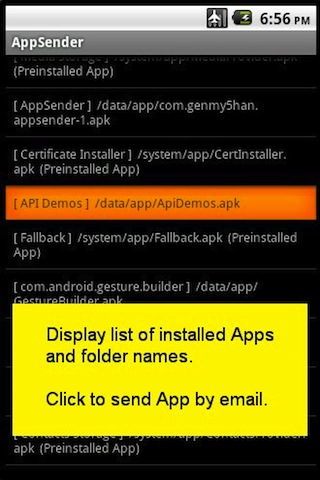
    The main user interface that displays all installed apps now displays product icon. It looks so much nicer now. As always, you can simply click on the App name to send it as an email attachment. The updated version is now available on Android Market. Support English and Japanese languages.

    [DOWNLOAD AppSender for FREE from Android Market]

    2011年5月22日日曜日

    AppSender BETA now available at Android Market

    AppSender BETA - Select and send an installed App from your Android

    [FREE DOWNLOAD from Android Market]

    AppSender BETA version is available for FREE until Sept 1, 2011. I hope some of you find the tool useful. I hope to enhance the tool as time goes...

    Here's some background. This app was originally intended for developers who need to extract/copy apps from their Android device to other Android device or PC. On PC, you can simply drag and drop attachments to an email, but its not that simple on Android device.

    If you are an Android developer, you can extract/copy apps using Android SDK "adb pull" command along with the apps "install path" name. Since the install path information is not available from default Android GUI, AppSender can be used to help identify the install path name. But to make things much easier, AppSender can automatically attach the selected app to an email on you Android device. Just pick an app from a list and AppSender will do the rest (send the app via email attachment). BTW, path name will also be included in the email body.

    Hope you enjoy this tool. If you find a bug or have feedback, please email me at moto.android.software@gmail.com.


    App will be available from Android market shortly. I'm planning to release it for free for limited time. More info shortly...

    [FREE DOWNLOAD from Android Market]